Quick answer
An open source SIEM collects, normalizes and analyzes logs and security telemetry to detect threats and support compliance, without vendor license fees. Wazuh is one of the most widely used open source SIEMs, Security Onion is a strong choice for network monitoring, and OpenSearch suits teams building their own platform. The software is free, but running it is not. MSSPs that outgrow a free SIEM can have WhyCrew build a platform they fully own.
Key takeaways
- A SIEM is only as good as its tuning and the team that runs it, whichever tool you pick.
- "Free" and "open source" aren't the same thing. Graylog Open and parts of Security Onion use source-available licenses.
- Skip retired tools like AlienVault OSSIM and Apache Metron.
- Start with a few high-value log sources and tested rules, not everything at once.
Ask a SOC lead about their biggest headache and you'll often hear the same thing: too many logs, in too many places, each saying very little on its own. A SIEM brings them together so your team can see that ten failed sign-ins and a new admin account are part of the same attack.
We're the engineering team at WhyCrew, and we work inside these tools every day. This guide covers which free and open source SIEM tools are worth your time, how they work, what they really cost and when a free SIEM stops being enough.
This guide is for security leaders, SOC managers, IT teams, MSSPs and home-lab learners comparing open source SIEM tools, free SIEM options and custom-built platforms.
What Is an Open Source SIEM?
An open source SIEM is a security information and event management system with public source code. Anyone can use it, read it and change it, and there's no license fee. Like any SIEM, it gathers security events from across your systems, standardizes them, checks them against detection rules and alerts your team when something looks wrong.
Most open source SIEMs aren't a single program. They're platforms made from several open source projects. For example, OpenSearch handles storage and search, Zeek and Suricata watch the network, and Sigma provides detection rules.
Open Source vs Source-Available vs Free SIEM
SIEM software falls into three groups.
Open source
Uses an OSI-approved license, such as GPL, AGPL or Apache 2.0. You can run it, change it and offer it to others, as long as you follow the license.
Source-available
You can read the code, but the license adds limits the OSI doesn't accept. The two common ones are the Server Side Public License (SSPL) and the Elastic License 2.0 (ELv2). Both are fine for your own internal use. Both limit offering the software itself as a hosted or managed service, which can matter for MSSPs.
Free tier
A paid product with a free edition. That edition usually has a data cap or is missing key features. Splunk Free is a well-known example.
All three can be the right choice, as long as you check the license before you build a business on it. If SIEM itself is new to you, start with what a SIEM does and how it works, then come back to compare tools.
What Are SIEM Tools and SIEM Systems?
SIEM tools are security platforms that combine log management with real-time event correlation. They help a team spot threats, look into incidents and prove compliance, all from one place. A "SIEM system" means the whole setup: the software, plus the servers, storage, connections and rules that make it useful.
Core functions of a SIEM
Open source or paid, every SIEM does four main jobs.
Log aggregation: it gathers logs and events from servers, firewalls, laptops, cloud services and apps into one place you can search.
Event correlation: it links related events from different sources into one alert, so analysts see the full picture instead of scattered clues.
Compliance reporting: it keeps security records for as long as the rules require and creates evidence for standards like PCI DSS, HIPAA, ISO 27001 and GDPR.
Response integration: it sends alerts to ticket systems and SOAR platforms, which run predefined playbooks to stop threats faster.
Types of SIEM tools
There are four common types. Free and self-hosted SIEMs, like Wazuh or Security Onion, run on your own Linux servers or cloud accounts with no license fee. Commercial on-premises SIEMs, like Splunk Enterprise Security or IBM QRadar, are paid software you run yourself. Cloud-native SIEMs, like Microsoft Sentinel or Google Security Operations, are paid services billed by data or usage. Managed SIEM services add a provider's analysts on top of any of these.
There's also a fifth option in between: a custom-built, owned SIEM platform. It's built around your own log sources, clients and compliance needs, on open source tools like OpenSearch or Wazuh. You pay for it once instead of renting it.
How Does an Open Source SIEM Work?
An open source SIEM works in five stages. It collects logs, puts them in one format, stores them, checks them against rules and sends alerts to analysts. If one stage is weak, every stage after it suffers.
Interactive · select a stage
Stage 01 of 05
Collect
Agents on servers and laptops, syslog from network devices and API connections to cloud services bring security events into the SIEM.
Collection. Agents on servers and laptops, syslog from network devices, and API connections to cloud services bring events in.
Normalization and enrichment. Every product writes logs in its own way. So the SIEM maps fields like user, host and IP address into one shared format. Open formats such as OCSF (Open Cybersecurity Schema Framework) and ECS (Elastic Common Schema) save you from building your own. Enrichment then adds context, like who owns a server or whether an IP address is known to be malicious.
Storage and indexing. Events go into a search engine like OpenSearch, or a fast analytics database like ClickHouse.
Detection and correlation. Simple rules flag single risky events. Correlation rules link related events from different sources. This is the step that turns a pile of logs into a useful security tool.
Investigation and response. Analysts look at the evidence and work out what happened. Many teams let automated SOAR playbooks handle the repeat steps. They keep a human sign-off for big actions, like disabling an account.
Example: three ordinary events, one alert
Let's say an employee's account has a burst of failed sign-ins one evening. A few minutes later, it signs in from a device nobody has seen before. Soon after, the cloud audit log shows an admin role being added to that same account.
Interactive · select an event
Correlation rule · 0 of 3 signals
No events yet
A single event like this is common. The SIEM keeps watching for related activity on the same account.
Each event could be innocent on its own. Together, on one account in a short time, they look a lot like an account takeover. The SIEM pulls the evidence from three systems into one alert. An analyst then checks it before anyone acts.
The Best Open Source SIEM Tools
The seven free and open source SIEM tools worth a look are Wazuh, Security Onion, OpenSearch Security Analytics, UTMStack, Elastic Security, Graylog Open and OSSEC. They're listed from the most complete platform to the most specialized.
How we evaluated these tools: We checked each tool's license and main features against its official documentation. We made sure it's still actively maintained. Then we looked at how much of the SIEM job it covers on its own, from collecting logs to compliance reports. We also weighed how easy it is to set up, how big its community is, and our own experience building platforms on OpenSearch and Wazuh.
01 Wazuh: best all-in-one open source SIEM
Open source- What it is
- Wazuh is a free, open source security platform that combines SIEM and XDR (extended detection and response). It started as a fork of OSSEC and is now used by teams of every size.
- Key features
- One lightweight agent works on Windows, Linux and macOS. It analyzes logs, watches for file changes and finds vulnerable software. It checks settings against CIS benchmarks and can block threats on a device through active response. It also maps to compliance standards like PCI DSS, HIPAA, GDPR and NIST 800-53. Wazuh has four parts: the agent, the Wazuh server (also called the Wazuh manager), the Wazuh indexer and the Wazuh dashboard. The indexer and dashboard are built on OpenSearch.
- Best for
- Teams that want to watch all their laptops and servers in one platform, without stitching several tools together. It suits small businesses and large companies alike.
- License and cost
- Free and open source under GPLv2 and Apache 2.0. Wazuh also sells a paid hosted version, Wazuh Cloud, if you don't want to run the servers yourself.
- Watch out for
- The default rules are many and noisy until you tune them. The interface takes time to learn, and storage planning matters more as you add devices.
02 Security Onion: best for network security monitoring
Mixed · ELv2- What it is
- Security Onion is a free Linux distribution built for threat hunting, network monitoring and log management. It packs several proven tools into one platform you can install.
- Key features
- Network data from Zeek, intrusion detection from Suricata, full packet capture, log search and dashboards on the Elastic stack, detection rules and built-in case management.
- Best for
- Threat hunters and network-focused SOC teams who need to see what systems say to each other, not just what happens on each device.
- License and cost
- Free to use. Most of the included software is open source. But Security Onion's own parts and its Elastic parts use the Elastic License 2.0. That's a source-available license, and it limits offering the software as a managed service.
- Watch out for
- You'll need strong hardware, smart sensor placement and solid network skills. It's not a good first SIEM.
03 OpenSearch Security Analytics: best foundation for building your own SIEM
Open source- What it is
- OpenSearch is the open source search and analytics engine that split from Elasticsearch in 2021. Its Security Analytics feature adds SIEM tools on top.
- Key features
- Ready-made detectors for common log types, including AWS sources like CloudTrail and VPC Flow Logs. It also includes open source Sigma rules, alerting, threat intelligence matching and a correlation engine that links findings from different log sources.
- Best for
- Teams with strong engineers, companies already using OpenSearch, and AWS-heavy setups. It's also a common base for custom SIEM platforms.
- License and cost
- Free and open source under Apache 2.0, a permissive license with few limits. Managed hosting, like Amazon OpenSearch Service, costs money.
- Watch out for
- It's a foundation, not a finished product. You'll have to design how logs are collected, formatted, stored and acted on.
04 UTMStack: best open source SIEM with built-in SOAR
Open source- What it is
- UTMStack is an open source SIEM and XDR platform with SOAR automation built in. It's also listed in CISA's catalog of free cybersecurity tools.
- Key features
- Real-time correlation, detection rules mapped to MITRE ATT&CK, visual response workflows, threat intelligence and compliance reports.
- Best for
- Small and mid-sized teams that want SIEM, automation and compliance in one package, with less setup work.
- License and cost
- The open source edition is free under AGPL-3.0. Paid editions are also available.
- Watch out for
- Its community is smaller than Wazuh's or Elastic's, so you'll find fewer guides and add-ons.
05 Elastic Security (ELK SIEM): best for custom analytics at scale
AGPL · SSPL · ELv2- What it is
- Elastic Security is the security layer of the Elastic stack, often called the ELK stack (Elasticsearch, Logstash and Kibana).
- Key features
- Very fast search across huge amounts of data, a public library of ready-made detection rules, investigation timelines, case management and endpoint protection through Elastic Defend.
- Best for
- Experienced engineering teams that want lots of flexibility and will invest time in tuning and scaling.
- License and cost
- In 2024, Elastic added AGPLv3 as a license option. The core source code can now be used under AGPLv3, SSPL or the Elastic License 2.0. The free tier covers the basics, but many advanced security features need a paid plan.
- Watch out for
- It needs a lot of computing power, and turning it into a full SIEM takes extra setup. Check which features are in which plan before you commit.
06 Graylog Open: best for log collection and management
Source-available- What it is
- Graylog is a central log management platform. It's known for fast search, a clean interface and flexible processing pipelines.
- Key features
- It takes in large volumes of logs, parses and enriches them, and offers dashboards and alerts. It's often paired with Wazuh, with Graylog handling the flow of logs.
- Best for
- Teams whose first problem is getting firewall, server and app logs into one place, before they invest in deeper detection.
- License and cost
- Free to use. But since version 4.0, Graylog Open has used the SSPL, which the OSI doesn't approve. The fuller SIEM features are in the paid Graylog Security product.
- Watch out for
- On its own, Graylog Open is a log platform, not a complete SIEM.
07 OSSEC: best lightweight host intrusion detection
Open source- What it is
- OSSEC is a long-running open source host-based intrusion detection system (HIDS). It's also the project Wazuh first forked from.
- Key features
- Log analysis, file change monitoring, rootkit detection and active response on each machine.
- Best for
- Light monitoring of individual machines, and older systems where a full SIEM would be too much.
- License and cost
- Free and open source under GPLv2.
- Watch out for
- It isn't a full SIEM. Its visuals are basic, and you'll need other tools for central search and correlation. That's why many new setups choose Wazuh instead.
Retired or limited tools you'll still see in older lists
Some "best open source SIEM" articles haven't been updated in years. They still recommend projects that are no longer maintained or are too limited for real use.
AlienVault OSSIM was once the go-to free SIEM. It was discontinued after AlienVault became part of AT&T Cybersecurity, now LevelBlue, and it no longer gets updates. Apache Metron was retired by the Apache Software Foundation in 2020 and archived in 2021. Prelude OSS is the limited free edition of a paid SIEM and is mainly useful for testing.
Splunk Free shows up on many of these lists too, but it isn't open source. It's a free license with a 500 MB daily data limit, no alerts and no user authentication. It's fine for learning, but not for production monitoring.
Open Source SIEM Tools Compared
Licenses and features can change, so check each project's documentation before you decide.
| Tool | Type | License | Cost | Setup | Best for | MSSP multi-tenancy |
|---|---|---|---|---|---|---|
| Wazuh | SIEM and XDR platform | Open source (GPLv2, Apache 2.0) | Free; paid Wazuh Cloud | Moderate | All-in-one endpoint and server monitoring | Possible with extra engineering |
| Security Onion | Network security monitoring distribution | Mixed: open source plus ELv2 | Free; paid support and appliances | Hard | Threat hunting and network visibility | Not built in |
| OpenSearch Security Analytics | SIEM layer on a search engine | Open source (Apache 2.0) | Free; managed hosting is paid | Hard | Building a custom or AWS-centered SIEM | Building blocks only |
| UTMStack | SIEM, XDR and SOAR platform | Open source (AGPL-3.0) | Free edition; paid editions priced per device | Moderate | Small and mid-sized teams wanting built-in automation | Supported |
| Elastic Security | Security analytics on the ELK stack | AGPLv3, SSPL or ELv2 | Free tier; advanced features paid | Hard | Large-scale custom analytics | Partial, mostly in paid tiers |
| Graylog Open | Log management platform | Source-available (SSPL) | Free; SIEM features in paid edition | Moderate | Log collection and parsing | Not in the free edition |
| OSSEC | Host intrusion detection | Open source (GPLv2) | Free; commercial editions available | Moderate | Lightweight host monitoring | Not built in |
All seven are general-purpose products. None of them was built around your clients, your data rules or your compliance needs, so you end up changing how you work to fit the tool.
Wazuh vs Security Onion: Which One Should You Choose?
In short: Wazuh is better for monitoring servers and laptops, Security Onion is better for network visibility and threat hunting, and many teams run both.
Wazuh and Security Onion are both free SIEM platforms, but they do different jobs.
Wazuh puts an agent on every server and laptop. That lets it see programs, file changes, unsafe software, bad settings and sign-ins. It also scales to thousands of devices.
Security Onion sits on the network instead. Using Zeek and Suricata, it records connections and suspicious traffic, and it can save full copies of network traffic for deep investigations. It catches things that never touch a monitored device, like an unknown device talking to a malicious server. The downside is that it needs more hardware and more network skills.
| Feature | Wazuh | Security Onion |
|---|---|---|
| Main view | Endpoints and servers | Network traffic |
| How it collects data | Agents, syslog and cloud APIs | Network sensors and log ingestion |
| Ease of setup | Moderate | Harder |
| Compliance reporting | Built in | Limited |
| License | Open source | Mixed open source and ELv2 |
If you run both, plan how to bring their alerts into one place, because switching between two dashboards adds work.
The Best Free SIEM for Your Situation
The best free SIEM depends on who will run it and what you need to watch. For home labs, start with Wazuh. Small businesses usually do best with Wazuh or UTMStack, network-heavy and OT sites with Security Onion, and MSSPs with a multi-tenant platform built on OpenSearch or Wazuh.
Best free SIEM for a home lab
One virtual machine is enough to run Wazuh's server, indexer and dashboard for a few agents, and the documentation is very detailed. Want to learn network monitoring too? Add Security Onion on a second machine, connected to a network tap or a mirrored switch port. Building both is a practical way to prepare for a SOC analyst job.
Best SIEM for small businesses
If you have some in-house IT skills, Wazuh or UTMStack give you the most coverage for the least effort. The bigger question is who will read the alerts. If nobody has time, a managed service will likely protect you better than a free tool that nobody checks.
Best open source SIEM for MSSPs
MSSPs need things a single company doesn't: fully separate data for every client, per-client retention rules, and branded portals and reports. Open source tools, especially OpenSearch and Wazuh, give you the building blocks. But turning them into a reliable multi-tenant SIEM platform takes serious engineering.
Best SIEM for operational technology (OT) environments
Factories and other critical sites need monitoring that never disturbs delicate machines. Security Onion is a strong free choice here. Its built-in Zeek sensor can read common industrial protocols like Modbus and DNP3 without touching the devices. Wazuh can then cover the Windows and Linux computers on site, like engineering workstations and control screens (HMIs). Larger sites often add a dedicated paid OT security product that sends its alerts into the SIEM.
Building a Modular Open Source SOC Stack
A SIEM is the center of a security operations setup, but it isn't the whole setup. Many teams build a modular open source stack. They pair a main SIEM like Wazuh or OpenSearch with a specialist tool for each job.
Log routing: Graylog, Fluent Bit or Vector collect, sort and route large amounts of logs before they reach the SIEM. This helps keep storage costs down.
Dashboards: Grafana is popular for custom dashboards and for tracking alert trends.
Case management and SOAR: TheHive or DFIR-IRIS track investigations, and Shuffle offers drag-and-drop automation.
Threat intelligence: MISP and OpenCTI collect and share signs of known attacks, then feed them into the SIEM.
Detection content: Sigma provides ready-made detection rules, written by the community, that work with most SIEMs.
This approach is flexible and avoids lock-in, but every extra tool is one more thing to update, secure and connect, and the glue between them is often scripts only one engineer understands.
Top Commercial SIEM Tools and How They Compare to Open Source
Most "top SIEM tools" lists are full of paid platforms like Splunk Enterprise Security, Microsoft Sentinel, Google Security Operations, IBM QRadar and Exabeam. The details vary, but the business model is the same. You rent the platform, and the bill usually grows with the amount of data you send and keep. That's the main difference between paid and open source SIEM tools.
| Open source SIEM | Commercial SIEM | WhyCrew custom-built | |
|---|---|---|---|
| Software cost | No license fee | Recurring, usually based on data volume | One-time fixed-price build, no license fees afterwards |
| Ownership | You own your deployment, not the project roadmap | The vendor owns the platform and roadmap | You own the source code, infrastructure and roadmap |
| Fit to your needs | General-purpose, you adapt it | General-purpose, the vendor decides features | Designed around your log sources, clients and compliance scope |
| Multi-tenancy for MSSPs | Needs significant engineering | Depends on vendor and plan | Built in for MSSP engagements |
| Vendor lock-in | Low | Can be high, with proprietary formats | None, with open formats and full source code |
| Support model | Community, or a paid partner | Vendor support contract | Handover with documentation and training, optional ongoing help |
Some MSSPs and regulated teams take a third path: they leave a rented platform for one they own, using a zero-downtime SIEM migration so coverage never drops during the switch.
Pros and Cons of Free SIEM Systems
The biggest benefit is cost control: with open source, more data means more hardware, not more license fees. You also get full control over where your data lives and who can see it, which matters for data residency rules. And when a detection acts strangely, your engineers can read the code themselves.
The main downside is the work of running it. You can install a SIEM in a day, but turning it into a reliable service with steady data, tuned rules, backups and an incident plan takes months of skilled work. Unless you pay a partner, there's no vendor to call when it breaks. So the question is whether you have, or can buy, the skills to run it well.
How Much Does an Open Source SIEM Really Cost?
You pay nothing for the license itself. The real cost comes from four places: storage, compute, engineering time and the analysts who watch the alerts. Storage is the easiest to estimate. Engineering and people usually cost the most.
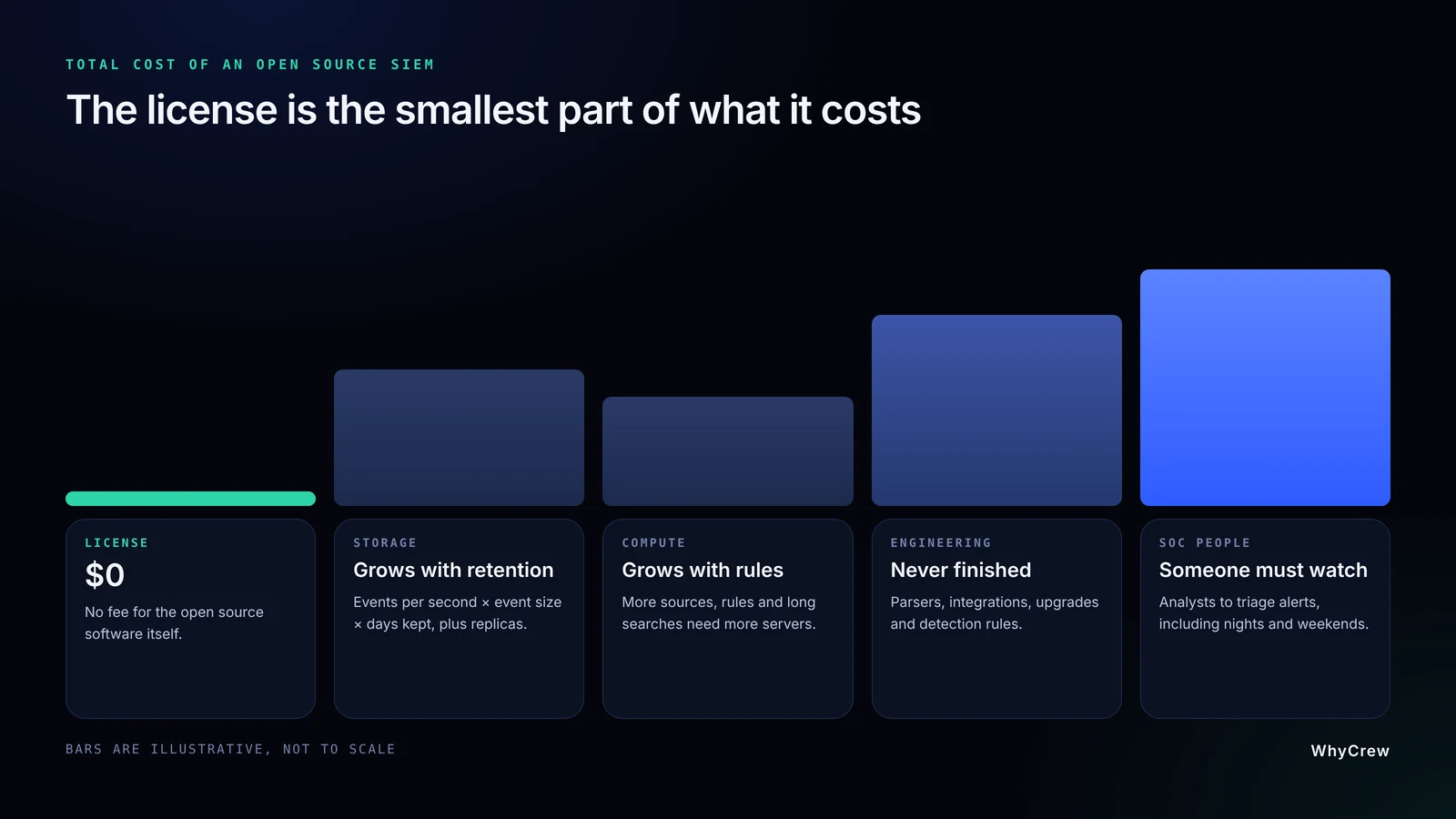
A simple storage estimate
Imagine a setup that creates 1,000 events per second on average, and each event is about 800 bytes. That's about 69 GB of raw data a day (1,000 × 800 bytes × 86,400 seconds). Over 90 days, it adds up to roughly 6.2 TB. Over a year, it's about 25 TB.
SIEM storage estimator
Move the sliders
Daily raw data
69.1 GB
Raw total for 90 days
6.22 TB
Stored with copies
6.22 TB
Decimal units, constant average event rate. Excludes indexing overhead, compression and backups, which change the real figure.
Those are raw numbers. Indexing adds extra space. One replica doubles the total, and backups add more. Compression brings the total back down a bit.
The costs a quote never shows
Computing power grows with every rule, data source and long search during an incident. Engineering time is the cost teams forget most: building connections, fixing parsers when vendors change log formats, testing updates and keeping rules current. And a SIEM nobody watches at night only protects you during the day.
A fair comparison looks at three to five years and weighs licensed SIEM pricing against the full cost of a platform you own.
Self-Hosted SIEM Architecture: Single Server or Distributed?
Most open source SIEM systems are self-hosted on Linux, either on your own hardware or in your own cloud account. How you set up the parts decides how fast, reliable and costly the platform will be.
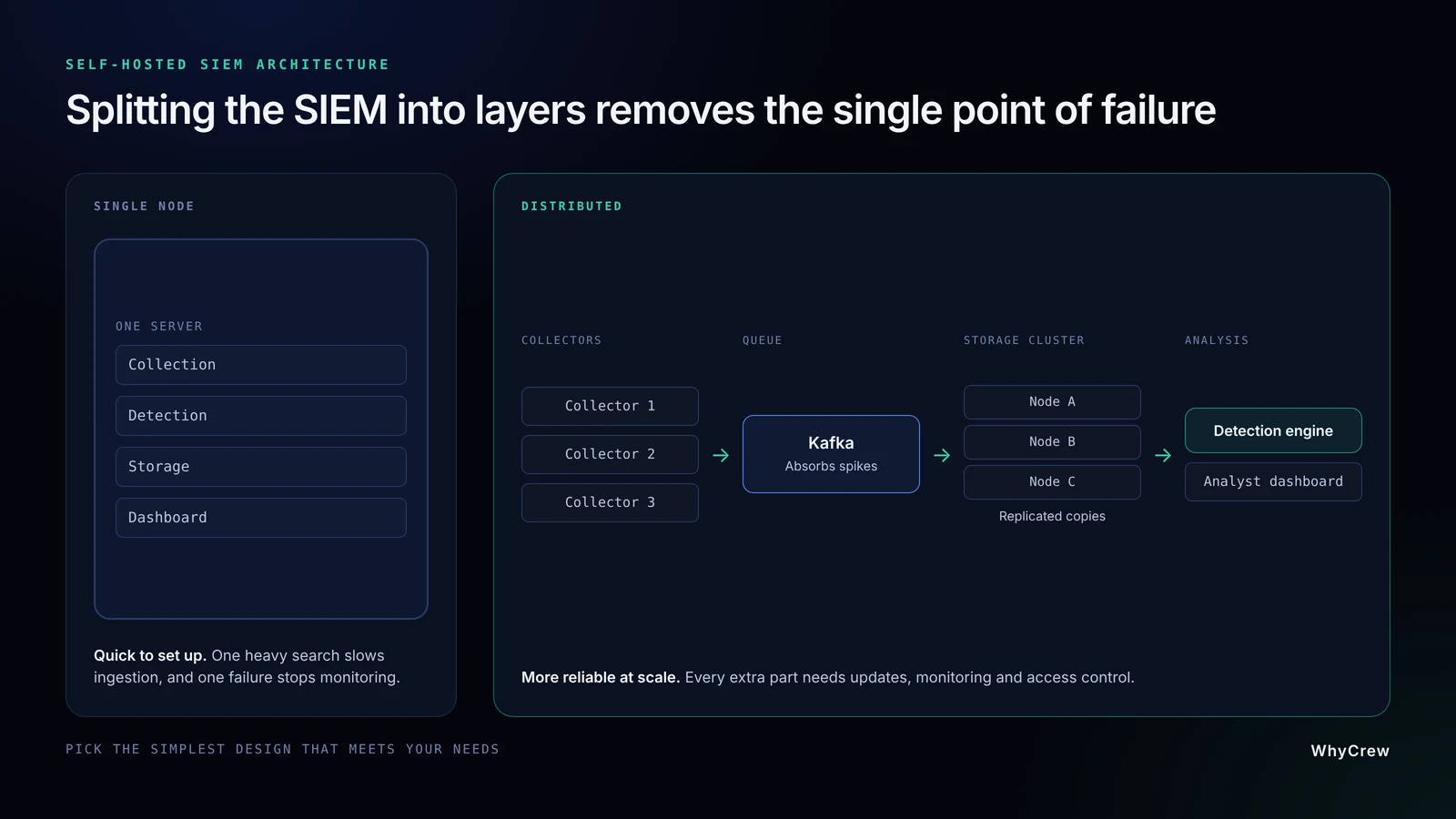
A single-node deployment runs collection, detection, storage and the dashboard on one server. It's quick to set up and works well for a home lab, a test or a small business. The catch is that everything shares one machine. A heavy search can slow down incoming data, and if that server fails, monitoring stops.
A distributed deployment splits the parts across several machines. Several collectors receive data, so one failure doesn't lose events. A queue like Apache Kafka absorbs sudden spikes, such as the jump in logs during an attack. A storage cluster keeps copies of data on more than one server. Detection and analyst tools get their own resources too. But every extra part needs updates, monitoring and access control, so pick the simplest design that meets your needs.
Hardware requirements: a Wazuh example
Wazuh's official quickstart runs the server, indexer and dashboard together on one 64-bit Linux machine. Wazuh says this is usually enough for up to 100 devices with 90 days of alert data.
| Monitored endpoints | CPU | RAM | Storage for 90 days |
|---|---|---|---|
| 1 to 25 | 4 vCPU | 8 GiB | 50 GB |
| 26 to 50 | 8 vCPU | 8 GiB | 100 GB |
| 51 to 100 | 8 vCPU | 8 GiB | 200 GB |
For more than 100 devices, Wazuh recommends a distributed setup. Keep in mind these numbers are for alerts from typical devices. Busy sources like firewalls or network sensors need much more storage.
Hot, warm and cold storage
Most SIEM data is searched a lot for a few weeks, then hardly at all. Tiered storage is built around that. Hot storage keeps recent events on fast disks for investigations. Warm storage keeps older data on cheaper hardware. Cold or archive storage keeps long-term records at the lowest cost for audits. Getting these tiers right is usually the best way to cut storage costs.
How to Choose and Deploy a Free SIEM
Don't choose a SIEM by its feature list. Judge it by how it handles your data, your volumes and your team.
Questions to answer before you choose
Ask which log sources you need to cover (Windows, Linux, firewalls, Microsoft 365, AWS) and how well the tool reads them. Check the quality of its built-in detection rules and whether it supports Sigma and MITRE ATT&CK. Find out how it grows from one server to many, what it connects to, how active the project is, and whether it produces the compliance reports you need.
Deploying it, step by step
- 01Decide what you need to detect. List the few threats that would hurt your business most, like stolen passwords or unapproved admin changes. These decide which logs matter.
- 02Start with a few important sources. That's usually your sign-in system (identity provider), admin activity on key servers, firewall or VPN logs, and your main cloud account. Collecting everything on day one just adds cost and noise.
- 03Measure your volume and size the platform. Run a week of sample data. Measure events per second and event size. Then size your storage and servers from real numbers, not guesses.
- 04Build a test setup and check the data. Before you write any rules, make sure events arrive on time, timestamps are right, and fields like user and host are read correctly.
- 05Add and test detections. Trigger each rule on purpose, in a safe way, and check that the alert shows the right evidence. Then filter out what's normal for your systems.
- 06Decide who responds. Agree who gets urgent alerts at night and on weekends. Decide how rule changes are approved and what happens when a log source goes quiet. Then grow step by step, repeating steps 2 to 5.
Common mistakes to avoid
Default rules know nothing about your environment, so don't trust them as they come. Check data quality early, because bad fields make correlation fail silently. Plan for upkeep too, since collectors break and certificates expire. The biggest mistake is having no clear owner for alerts. A SIEM can raise exactly the right alarm and still fail if nobody acts on it.
Detection Engineering: Where Free SIEMs Succeed or Fail
Many teams collect huge amounts of logs and still miss attacks. The difference is detection engineering: the ongoing work of writing, testing and updating the rules that decide what becomes an alert.
Sigma rules give you a head start, with thousands of community rules most open source SIEMs can use. But a rule only fires if your data matches it, so check every rule's fields and test it. MITRE ATT&CK shows which attacker techniques you cover. In October 2025, version 18 replaced its old Data Sources with Detection Strategies and Analytics, so older coverage reports may need an update. Treat coverage as a map, not a score.
The best proof is to safely attack yourself. Breach and attack simulation (BAS) and purple-team exercises replay known attacker techniques and show which ones your SIEM catches. Track results like Mean Time to Detect (MTTD) and Mean Time to Respond (MTTR), and keep false alarms down, since constant noise is a major cause of SOC analyst burnout.
Security and Compliance
Is an open source SIEM secure?
You can run one securely, but remember that it's one of the most valuable targets on your network. It holds usernames, computer names, internal IP addresses and a record of every admin action. That's a gift to any attacker who gets in.
Treat it like the critical system it is. Keep its admin screens on a separate, locked-down network, and require multi-factor authentication for every admin. Encrypt traffic between agents and servers, and install updates on a regular schedule. Keep audit evidence on write-once (immutable) storage, so nobody can quietly rewrite history. Finally, run a separate health check that warns you when collectors stop sending data. A SIEM can't warn you about its own outage.
Can an open source SIEM support compliance?
Yes. It can collect, protect and keep the security evidence that standards like ISO 27001, PCI DSS and HIPAA expect. It can also support rules such as GDPR, NIS2 and DORA. Auditors care about your controls, not whether you paid for the software.
What a SIEM can't do is make you compliant by itself. It covers the logging and monitoring part. It shows that the right events are collected, kept long enough, protected from tampering, reviewed by someone and turned into incident reports on time. In regulated industries, also check timestamps, who can see the logs and where the data is stored.
This is often where general-purpose tools fall short, because each regulator wants evidence in its own format. WhyCrew builds those needs into the platform from day one. That includes NIS2 and DORA compliance automation, with incident-reporting workflows and EU data residency. It also includes SIEM platforms designed for NCA ECC and SAMA CSF compliance in Saudi Arabia. Rules still vary by country and industry, so check your obligations with a qualified compliance advisor.
AI and the Future of SIEM
The next big change in SIEM is about understanding logs faster, not collecting more of them.
AI-assisted triage: AI models can sum up alerts, find related events and suggest next steps, which saves Tier-1 analysts a lot of time. But AI can be confidently wrong, and many cloud AI assistants send your data to an outside company. That's one reason teams consider an AI SOC model and choose to run the AI models inside their own environment, so alert data never leaves their network.
UEBA: User and entity behavior analytics learns what normal looks like for each user and device, then flags unusual activity like sign-ins at odd hours. It's mostly a paid-platform feature today, but teams can build similar checks on OpenSearch with its anomaly detection plugin.
Open standards: OCSF, Sigma and MITRE ATT&CK make it easier to move data and rules between tools, which means less lock-in. When you decide what to automate, a simple reversibility test for AI SOC automation helps: easy-to-undo actions can run on their own, while bigger ones keep a human in the loop.
When a Free Open Source SIEM Is No Longer Enough
There's no exact moment when a free SIEM stops working. You notice it as growing friction. Searches slow down as data grows. Engineers spend more time fixing connections than improving detections. Or an auditor asks how your evidence is protected, and nobody has a clear answer.
MSSPs usually hit this point first, as their client count grows. Regulated companies hit it when auditors expect fast incident reports under NIS2 and DORA or monitoring evidence under NCA ECC and SAMA CSF.
Reaching these limits doesn't mean throwing open source away. The smarter move is to keep the open source parts that work and build the missing layers around them. The choice comes down to the open source vs custom-built SIEM trade-off. Who owns the roadmap? Who does the upkeep? And which model handles multi-tenancy and compliance best for your business?
How WhyCrew fits in
We're not a free SIEM vendor, and we're not a managed security provider. WhyCrew is an engineering team, based in Canada, that designs and builds custom SIEM, SOAR and SOC platforms for MSSPs and regulated companies. When the build is done, we hand it over.
We build on proven open source tools like OpenSearch, Elasticsearch, ClickHouse and Wazuh wherever they fit. Then we build what open source doesn't cover. That includes white-label, multi-tenant SOC platforms for MSSPs, tuned data pipelines, detection rules written for your systems, compliance reports and private AI agents for SOC automation that keep alert data inside your network.
Every project is a fixed-price build, not a subscription. You pay once for the platform. At handover, you get the source code, the infrastructure, the documentation and hands-on training. That's how one growing MSSP moved from renting a SIEM to an owned security platform without any gap in coverage.
Frequently Asked Questions About Open Source SIEM
Yes, and there are several mature ones. Wazuh, OpenSearch Security Analytics, UTMStack and OSSEC all use OSI-approved open source licenses. Security Onion is free and mostly open source. Graylog Open and Elastic Security are free to start with, but they use source-available licenses or paid tiers for some features.
Wazuh is an open source SIEM system. It monitors laptops, servers and cloud workloads from one platform.
For most teams it's Wazuh. It covers log analysis, endpoint monitoring, vulnerability detection and compliance reporting in one platform, with no license cost.
Wazuh is a common starting point. Security Onion suits network-focused monitoring, UTMStack adds built-in automation, and OpenSearch Security Analytics suits a custom-built platform. Teams that outgrow all of these often move to a custom platform built on the same open source foundations.
SIEM tools are platforms that collect logs from across an organization, correlate events in real time and alert analysts to threats. Examples range from free tools like Wazuh and Security Onion to paid on-premises and cloud platforms.
Lists of top SIEM tools usually lead with big commercial platforms. The top five free and open source SIEM tools are Wazuh, Security Onion, OpenSearch Security Analytics, UTMStack and Elastic Security. Each fits a different need, from all-in-one endpoint monitoring to network visibility and custom-built platforms.
A SIEM is a technology. A SOC (security operations center) is the team and the processes that protect an organization. The SOC uses the SIEM as its main tool to collect logs, raise alerts and investigate incidents, with analysts working across SOC tiers from alert triage to threat hunting.
An EDR protects individual endpoints, using an agent to detect and respond to threats on laptops and servers. An XDR stretches that detection across several layers, such as endpoints, email, network and cloud. A SIEM collects logs from the whole environment, including EDR and XDR alerts, and correlates them for investigation and compliance.
Yes, as long as it supports your data sources, detections and workflows, but don't assume feature parity. Run both systems in parallel and confirm your critical detections still fire before switching off the old platform.
Yes, if someone on the team has the time and skills to run it. If not, a managed service is usually the safer choice.